
|
|
|
|
      |
Home | Product | Downloads | Purchase | Support |
User Forum |


 |
|
How to Adjust Source Image |
    How-to Articles How-to Articles As description in
Lesson 2, you can use the built-in tool to set
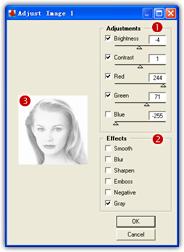
Adjustments effects of the image. There are two frames of controls, one is
Adjustments (
Adjustments These commands allow you to adjust brightness, contrast, color balance of the actual image. You can specify new values to affect the image by using the slider or the edit zone. If you specify 0, the adjustment is unused. You can turn on/off the check box above the adjustment item to compare the effect with the adjustment supplied to the effect no adjustment. Effects These commands allow you to set smooth, blur, sharpen, emboss, negative, gray effects to the actual image. Turn on one to know its effect.
| ||
|
Copyright © 2002-2004 Abrosoft. All rights reserved.
Contact Us |

 ),
and another is Effects (
),
and another is Effects ( ).
A Preview window (
).
A Preview window ( )
will real-time preview the adjusting.
)
will real-time preview the adjusting.