
|
|
|
|
      |
Home | Product | Downloads | Purchase | Support |
User Forum |


 |
|
How to Change the User Interface |
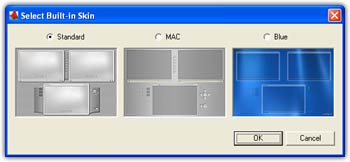
    How-to Articles How-to Articles From version 2.0, a brand new interface with skin has been implemented. The professional edition of FantaMorph has 3 built-in skins, and can import skin file anytime. If you like, you can create your own interface even. Select Built-in Skin 1. Choose Tools/Select Built-in Skin. A dialog box below opened.
2. Choose one option from Standard, MAC and Butterfly. 3. When done, Click OK. The interface switches to this skin immediately. Import Skin File 1. Choose Tools/Import Skin File. A dialog box opens. 2. Select a FantaMorph skin file (*.fms) in your disks. 3. When done, Click OK. The interface switches to this skin immediately.
| ||
|
Copyright © 2002-2004 Abrosoft. All rights reserved.
Contact Us |