
|
|
|
|
      |
Home | Product | Downloads | Purchase | Support |
User Forum |


 |
|
How to Set the View Mode |
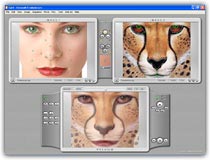
    How-to Articles How-to Articles There are 3 view modes in FantaMorph. They are all useful for different purpose. Full View Mode As default mode, the edit panel and the preview panel are presented in the main interface. Press F5 key anytime or choose View/Edit and Preview menu to set this view mode.
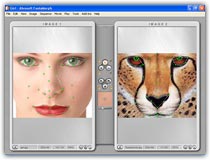
Edit Only Mode If the source images have big size or you want more area to edit exactly, press F6 key or choose View/Edit Only menu to set this view mode.
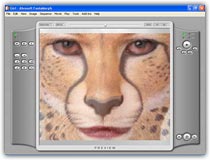
Preview Only Mode You may switch view mode to this after all edit work has been completed. Press F7 key or choose View/Preview Only menu to set this view mode which can make the largest area for morph playing. Turn on the Auto Loop switch, press Play button, then enjoy your morph now!
| ||
|
Copyright © 2002-2004 Abrosoft. All rights reserved.
Contact Us |