


|
|
|
|
      |
Home | Product | Downloads | Purchase | Support |
User Forum |


 |
|
How to Use Image Sequence Packer |
    How-to Articles How-to Articles The built-in tool named Image Sequence Packer in FantaMorph Pro is very useful for creating long morphs with three or more source images. See more about "How to Create Morph More than Two Images". 1. Choose Tools/Image Sequence Packer menu to open the packing window.
2. There is a button group for edit image sequence ( 3. Click to select one image in the list, it'll be
previewed in the Preview Panel ( 4. You can select one or more images in the list to delete, duplicate or move up/down by clicking the edit buttons. 5. You can add many many images to the list, and each image will become one of the frames of the resulting movie. 6. Choose one format option of Movie Format Options
( Remarks • You can pack any formats images which might have different size each other. You'd better use the image sequence with same size created by FantaMorph. • You can change the export size of the resulting movie freely, but it should has the same aspect ratio to the image sequence.
| ||
|
Copyright © 2002-2004 Abrosoft. All rights reserved.
Contact Us |

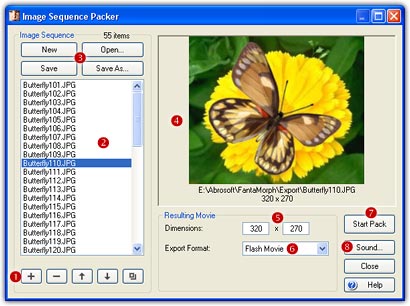
 ).
Click Add Image(s) button at first, choose a series of images (in most
case, morphing pictures exported with FantaMorph) into the Image List (
).
Click Add Image(s) button at first, choose a series of images (in most
case, morphing pictures exported with FantaMorph) into the Image List ( ).
The number of images will be shown in the topic of the image list.
).
The number of images will be shown in the topic of the image list. ),
and its size value will be set into the Movie Size box (
),
and its size value will be set into the Movie Size box ( )
for resulting movie.
)
for resulting movie. ),
then click Start Pack button (
),
then click Start Pack button ( ).
When FantaMorph packs each image to movie, you will see them appearing
one-by-one in the Preview Panel till the packing is completed.
).
When FantaMorph packs each image to movie, you will see them appearing
one-by-one in the Preview Panel till the packing is completed.