


|
|
|
|
      |
Home | Product | Downloads | Purchase | Support |
User Forum |


 |
|
Lesson 6 - Real-time playing |
    Online Tutorials Online Tutorials 1. In any other morphing software, you must render the morph to a file in order to see the entire morph. It's too troubled! By now, let FantaMorph give you an exciting feeling by using the great feature "Real-time Playing". You can set the Preview Only mode by F7 key or View/Preview Only menu. See more...
2. There are two useful switches making play much better,
the Auto Loop and the Auto Reverse ( 3. There are a group of buttons to control playing ( 4. As default, the preview speed is 15 fps (frames per second). If your computer has higher performance, you may increase the preview speed up to 30 fps, for example. 5. An important hint is that you can do any edit works when morph movie is real-time playing, which means you may see the final morph effect immediately.
| ||
|
Copyright © 2002-2004 Abrosoft. All rights reserved.
Contact Us |

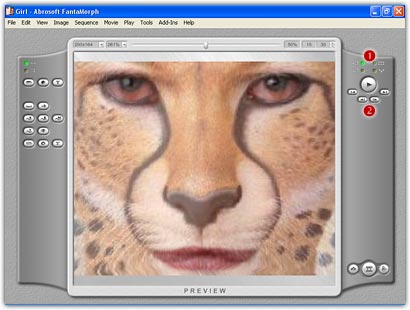
 ).
Turn on the Auto Loop switch, the playing will always repeat until you
press the Pause button. Turn on the Auto Reverse switch will make the
playing loop smoothly from start to end, then backward from end to
start.
).
Turn on the Auto Loop switch, the playing will always repeat until you
press the Pause button. Turn on the Auto Reverse switch will make the
playing loop smoothly from start to end, then backward from end to
start. ).
The biggest button is Play/Pause switch. Clicking it will start or end
playing. Clicking another 4 buttons will preview the first, the last, the
previous or the next of current frame.
).
The biggest button is Play/Pause switch. Clicking it will start or end
playing. Clicking another 4 buttons will preview the first, the last, the
previous or the next of current frame.